Gait & Movement
I want to help people understand how they run and use that understanding to reach their goals. My aim is to combine real-time gait analysis on phones and edge devices with feedback runners can see, talk through, and put into practice.
I began with two MetaMotion sensor pods and a Twilio-based service where people could text in their running videos. I wanted runners to discuss their movement with an AI coach, but the delay in those conversations was too great for the experience I wanted.
I tried Android next, then realized how many different devices I would need to support. Apple offered a more practical path: the Watch already had an inertial measurement unit (IMU), and I could use its machine-learning tools and run my own models on the Watch. The iPhone could handle video, models, and cloud connections. That became the platform for Run Fun.
Training and checking those models meant gathering data and comparing estimates with the original movement. That led me to a treadmill and a more repeatable capture setup. I was already using an Orin Nano Super for data collection and live inference, and found it faster than my desktop for some of my training work. That grew into Stride: an edge setup exploring gait feedback, interactive drills, and games for individual runners or running stores.
The goal is useful feedback while someone runs, followed by a way to review and understand it. The examples below show parts I built toward that goal.
See the app in use
This existing Run Fun demo shows the broader experience: selecting a recording, seeing model-generated overlays and explanations, and reviewing running form. It shows the product goal behind the computer-vision and modeling work.
Heel-strike detection on Apple Watch
I deployed a machine-learning model on Apple Watch to detect heel striking while running. That is the primary modeling story behind this work: turning recorded movement signals into useful feedback on a device a runner already wears.
The modeling work connects recorded inputs and temporal windows to training labels, evaluation, and on-device predictions. Computer vision is another part of the work: saved RTMPose body-with-feet output contains 26 estimated image points per frame, which can be inspected against the original video. Those visual estimates and a Watch model's measured performance are different parts of the evidence.
Run Fun's phone capture and review, Watch model work, and Stride's Orin-based camera/TensorRT pipeline are implemented parts of the broader effort. The goal is useful feedback during a run, with an explanation the runner can review.
What I built
Run Fun brought together SwiftUI phone capture, saved-clip playback, history, and comparison. I built interfaces for Watch and headphone motion capture, including accelerometer and gyroscope signals, and session/time alignment for analysis. The rendering pipeline turned captured video into pose-based visualizations available in the optional inspection material below. I also explored optional coaching interfaces, including voice, alongside the visual review workflow.
Stride was a separate treadmill camera and edge-computing system: camera recording, TensorRT inference on an active view, and interactive feedback. It shares engineering questions with Run Fun. Recording multiple cameras and running inference on one active view were separate parts of this workflow.
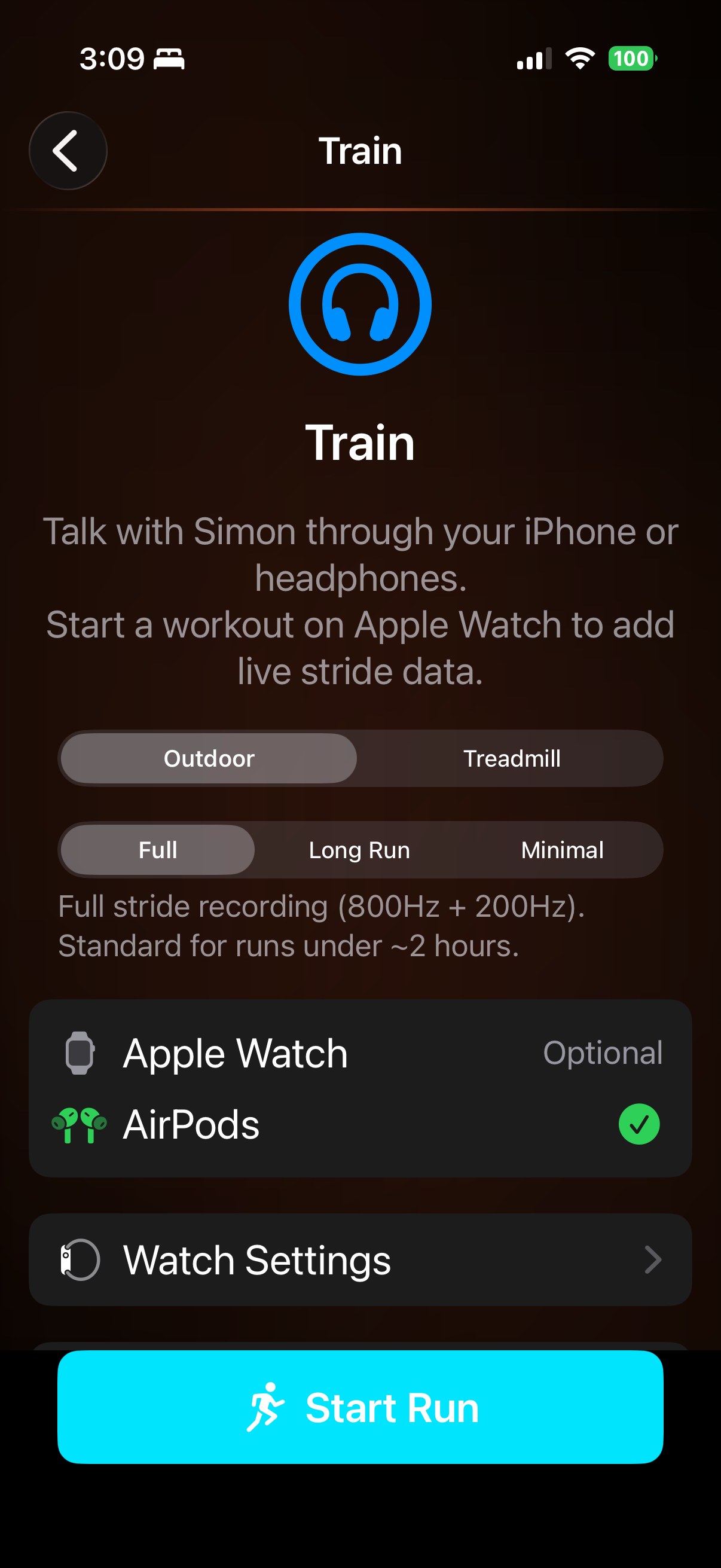
The surrounding integration mattered too: choosing a session, configuring capture, and finding a saved result again. This setup screen shows part of that product work.
From capture to review
Run Fun · phone + Watch
- Capture
Phone video / Watch motion - Align
Session and timing - Analyse
Movement signals - Review
Visual comparison
From analysis and review ↳ optional coaching interface, including voice
Stride · edge + cameras
- Capture
Camera inputs - Align
Session and timing - Analyse
Edge pipeline - Review
Visual comparison
What remains to test
The saved outputs above make the engineering tangible. They also leave a clear next question: can a runner or coach independently complete a comparison and understand one useful observation, with its uncertainty? Repeat use, a real payer, and time saved against an existing workflow would matter before expanding a narrower product. Those tests remain future work.
Continuing a product and preserving its engineering lessons are separate decisions for me to make.
These are historical outputs; current devices and providers were not exercised for this showcase. Accuracy across runners and conditions, clinical or injury-prevention use, and customer demand require evidence beyond these examples.
Inspect the saved pose output
The optional two-second phone-camera example pairs recorded frames with saved pose estimates. Open the frame inspector to scrub the camera and view a selected point’s image-position trace. Point errors are visible; wearable timing is not linked to this clip.
A separate pose-only rendering
Related public work
- Robotics Log #1 connects the earlier running-gait work to using richer sensors to teach a model that runs with fewer inputs.
- The video-rendering write-up follows a bottleneck in the surrounding engineering pipeline.
- The watchOS install fix documents a practical obstacle in getting wearable software onto a device.