<?xml version="1.0" encoding="utf-8"?>
<feed xmlns="http://www.w3.org/2005/Atom">
	<title>Vague, but exciting…</title>
	<subtitle>Engineering write-ups from 18 months of building an iOS/wearable sensor product — verified fixes, agent workflows, and the failures that wrote the runbook.</subtitle>
	<link href="https://vaguebutexciting.dev/feed.xml" rel="self"/>
	<link href="https://vaguebutexciting.dev/"/>
	<updated>2026-07-21T00:00:00.000Z</updated>
	<id>https://vaguebutexciting.dev/</id>
	<author><name>Colin Rooney</name></author>
	<entry>
		<title>Headless App Store submission, run end-to-end by a coding agent</title>
		<link href="https://vaguebutexciting.dev/posts/agentic-app-store-submission/"/>
		<id>https://vaguebutexciting.dev/posts/agentic-app-store-submission/</id>
		<updated>2026-07-21T00:00:00.000Z</updated>
		<summary>The full App Store Connect API recipe a coding agent used to submit an iOS release unattended — build upload, screenshot API, review submission, state verification — and the runbook of prior failures that made it work.</summary>
		<content type="html"><![CDATA[<p>At 00:01 UTC on July 11, 2026, a review submission for my iOS app — Run Fun: See Yourself, v2.0.0 — flipped to <code>WAITING_FOR_REVIEW</code> in App Store Connect. I didn't click Submit. A coding agent (Claude Code) did the whole final mile through the App Store Connect API: deleted stale screenshots and uploaded new ones, attached the processed build, created the review submission, submitted it, and then verified the state by reading it back. The app had existed as a concept for about 48 hours — a pivot cut from a much larger app — and it went from decision to &quot;waiting for review&quot; in those same 48 hours, with the agent doing the overwhelming majority of the work.</p>
<p>If you stop reading there, the takeaway is &quot;AI agents can ship iOS apps now.&quot; That takeaway is wrong in an important way, and the wrongness is the useful part.</p>
<p>Here's the claim I actually believe, and the evidence for it: <strong>the agent executed, in one night, a recipe that my failures had spent months writing.</strong> Nothing about that night was improvised. Every step the agent took either followed a runbook that a previous failure had paid for, or hit a brand-new failure — and the new ones are now in the runbook too.</p>
<h2>What the agent actually did that night</h2>
<p>The condensed flow, for people who came for the recipe (all raw App Store Connect API — fastlane turned out to be a dead end on my machine, more on that below):</p>
<ol>
<li><strong>Build &amp; upload:</strong> bump <code>CURRENT_PROJECT_VERSION</code>, <code>xcodebuild archive</code> → <code>-exportArchive</code> with an export-only options plist (<code>method=app-store-connect</code>, no <code>destination</code>) → upload the IPA with <code>xcrun altool --upload-app</code> using an ASC API key. 163 MB, 12-second transfer.</li>
<li><strong>Wait properly:</strong> poll <code>GET /v1/builds?filter[app]=…&amp;sort=-uploadedDate</code> until <code>processingState=VALID</code>. Not &quot;wait a bit and hope&quot; — poll for the actual state.</li>
<li><strong>Screenshots via API:</strong> for each image — delete the stale <code>appScreenshots</code> in the display set, <code>POST /v1/appScreenshots</code> to reserve upload operations, PUT the bytes, <code>PATCH uploaded=true</code> with an md5 <code>sourceFileChecksum</code>, then poll <code>assetDeliveryState</code> until <code>COMPLETE</code>.</li>
<li><strong>Attach the build</strong> to the version record, patch reviewer notes, keep <code>releaseType=MANUAL</code>.</li>
<li><strong>Submit:</strong> <code>POST /v1/reviewSubmissions</code> → <code>POST /v1/reviewSubmissionItems</code> linking the <strong><code>appStoreVersion</code></strong> relationship — <em>not</em> <code>appStoreVersionForReview</code>, which 409s — then <code>PATCH {&quot;attributes&quot;:{&quot;submitted&quot;:true}}</code>.</li>
<li><strong>Verify:</strong> read back the version and the review queue; both said <code>WAITING_FOR_REVIEW</code>. Only then report done.</li>
</ol>
<p>Two things went wrong that night, which is exactly the point. First: we'd deleted the Apple Watch screenshot set, reasoning that v2.0 has no user-facing Watch surface. ASC rejected the review submission item with <code>SCREENSHOT_REQUIRED.APP_WATCH_SERIES_4</code> — because the binary still <em>ships</em> a dormant, flag-gated Watch app, and if the binary ships it, the listing needs its screenshots. The agent recovered the previous version's Watch images through each localization's old screenshot set (<code>imageAsset.templateUrl</code>, fill in <code>{w}x{h}bb.{f}</code>) and re-uploaded them. Second: one of the new iPhone screenshots came back black — a staged camera capture the agent couldn't retake, because a camera pointed at nothing is one of the few things an agent genuinely cannot fake. We shipped three good screenshots and deferred the hero shot to a metadata update.</p>
<p>Both failures are now permanent lines in the runbook. That's the loop this whole post is about.</p>
<h2>The staircase this stood on</h2>
<p>Here is what that one night actually consumed, with dates. I went back through the repo's own records to check my memory, because &quot;I couldn't have done this cold&quot; is exactly the kind of claim people flatter themselves with.</p>
<p><strong>May 26 — the first submission took ~7 hours, by hand.</strong> Four build cycles, two screenshot redos, a privacy-declaration expansion. It produced a 12-item gotcha list that reads like a hazing ritual: screenshots must be <em>exactly</em> 1284×2778 (a native iPhone 17 Pro screenshot is 1206×2622 — &quot;close&quot; is a rejection); macOS screenshots carry an alpha channel that ASC rejects, and <code>sips</code> <em>silently fails</em> to strip it while PIL and ImageMagick work; the listing's &quot;Requires iOS X&quot; line is derived from the binary's deployment target, not your marketing copy; every data type you declare in App Privacy must appear, by Apple's exact name, in your privacy policy, because the reviewer reads both and matches them.</p>
<p><strong>June 21 — credential archaeology.</strong> A headless upload needs an ASC API key. The <code>.p8</code> had been created back in September 2025 and later removed from the repo; the working copy was recovered from a git blob in the repo's history, validated with openssl, and stored properly. The same session proved the &quot;normal&quot; path — uploading through the signed-in Xcode account — is flaky from a headless CLI context (Xcode 26's account layer can't reliably be reached from a spawned <code>xcodebuild</code>), which is <em>why</em> the API-key path matters. fastlane was also a dead end on this machine (system Ruby, no bundler). Every one of those dead ends cost real hours, once.</p>
<p><strong>June 25–26 — the recipe gets validated on a real release.</strong> Issuer ID resolved, device registration via <code>POST /v1/devices</code> proven (the CLI's <code>-allowProvisioningUpdates</code> does <em>not</em> register unknown devices, another thing you learn exactly once), and then v1.5.7 shipped through the full headless path: archive → export → altool → poll → attach → submit. A pre-submission audit that same day caught a genuine rejection blocker — a feature that had drifted out of its internal-build gate and contradicted a note we'd previously given Apple's reviewers.</p>
<p><strong>July 4 — the release-order trap.</strong> A marketing version closes for TestFlight beta review the moment it's released on the App Store (<code>ENTITY_UNPROCESSABLE.CLOSED_VERSION</code>). Learned on v1.5.8, encoded as &quot;do not click Release until beta review clears.&quot; This is why the agent left <code>releaseType=MANUAL</code> and why the human keeps the Release click.</p>
<p><strong>And under all of that: the app itself.</strong> The &quot;48-hour&quot; v2.0.0 was a carve-out from an app that took 18 months to build — the capture flow, the cloud GPU rendering pipeline it calls (already deployed, already canary-tested), the build system, the signing setup, the device-automation harness the agent used to screenshot its own UI changes on a physical iPhone. The velocity of the last 48 hours was almost entirely stored potential energy.</p>
<h2>The part that isn't about Apple at all</h2>
<p>There's a second dependency that's easy to miss because it doesn't live in any runbook: <strong>knowing when to believe the agent.</strong></p>
<p>Agents report success with the same fluent confidence whether or not the thing succeeded. Early on, I got burned by this repeatedly — &quot;done and verified&quot; claims where the verification was the agent's own optimism. The discipline that fixed it is boring and absolute: <em>verify the effect against an independent signal, never the self-report.</em> It's baked into the submission runbook in small, specific ways: don't trust the upload script's exit code (a trailing <code>tee</code> masks altool's real status — look for <code>UPLOAD SUCCEEDED</code> and a Delivery UUID); don't trust &quot;submitted&quot; until the API reads back <code>WAITING_FOR_REVIEW</code>; don't trust a config change until the serving system proves it changed.</p>
<p>That discipline is <em>why</em> the agent could run for hours without me watching. Not because it doesn't fail — it failed twice that night — but because the process doesn't let a failure masquerade as a success. It took months of being burned to internalize that, and I don't think there's a shortcut. If you hand an agent a task you've never done yourself, you have no independent signal to check it against, and you've built an unsupervised liar with API access.</p>
<h2>What the human still did</h2>
<p>Worth being precise about, since &quot;end-to-end&quot; invites exaggeration. I decided what the app was and what got cut. I reviewed the store description and What's New before they went up. I confirmed the privacy labels in the ASC web UI — there is <em>no</em> official API path for privacy labels (the endpoints 404 with a valid key; the one tool that automates them rides a private Apple-ID session API). I kept the Release click. And I was the reason there was anything to submit: the judgment calls about what a two-day pivot should contain came from 18 months of watching real users hit the previous app.</p>
<h2>The transferable version</h2>
<p>If you want an agent to do some multi-step, high-stakes process for you headlessly, I now believe the path is:</p>
<ol>
<li><strong>Do it by hand first, badly.</strong> The 7-hour version is not wasted time; it's the tuition.</li>
<li><strong>Write down every trap as it bites you</strong>, in a runbook the agent will literally read. Mine says things like &quot;READ IT&quot; at the top, and agents do.</li>
<li><strong>Make verification independent of the agent.</strong> Every step needs a check the agent can't wish into passing: a state read back from the API, a checksum, a serving system's own report.</li>
<li><strong>Keep the irreversible clicks human</strong> until the boring parts have earned trust. <code>releaseType=MANUAL</code> is a philosophy, not a config value.</li>
<li><strong>Feed failures back into the runbook the same night.</strong> The Watch-screenshot 409 is already in mine, so the next agent won't pay for it twice.</li>
</ol>
<p>The headline version of that night — <em>AI ships app in 48 hours</em> — is technically true and deeply misleading. The truthful version is better, I think: an agent turned 18 months of accumulated, written-down, independently-verifiable experience into one night of execution. The leverage is real. It's just not free, and it's not the model — it's the runbook, and the failures that wrote it.</p>
]]></content>
	</entry>
	<entry>
		<title>watchOS 26.5/26.5.1 breaks Watch app installs — the devicectl workaround</title>
		<link href="https://vaguebutexciting.dev/posts/watchos-26-5-install-fix/"/>
		<id>https://vaguebutexciting.dev/posts/watchos-26-5-install-fix/</id>
		<updated>2026-07-21T00:00:00.000Z</updated>
		<summary>Fix for watchOS 26.5/26.5.1 app installs failing with “could not be installed at this time” (ACXError Code=8 “Failed to create socket”, Xcode stuck on “Copying shared cache symbols” 403). Acknowledged Apple regression FB22807635; reproducible workaround: iPhone Bluetooth off + devicectl install over WiFi.</summary>
		<content type="html"><![CDATA[<p>If your Apple Watch is on <strong>watchOS 26.5 or 26.5.1</strong> and third-party apps won't install — the Watch app on the iPhone spins for about a minute on &quot;Install&quot; and then fails with <em>&quot;could not be installed at this time&quot;</em> — it's not your app, your provisioning, or your pairing. It's an acknowledged Apple regression, and there's a reproducible workaround that doesn't involve waiting for the next watchOS release.</p>
<p>I hit this as a developer trying to get my own dev build onto my watch, but the bug is device-wide: on the same watch, Snapchat and American Airlines failed to install the exact same way. Store apps, TestFlight, enterprise, and dev builds all ride the same broken path.</p>
<h2>The bug</h2>
<p>On watchOS 26.5/26.5.1, installs from the iPhone's Watch app (&quot;Available Apps → Install&quot;, or the &quot;Show App on Apple Watch&quot; toggle) fail after ~1 minute. It worked fine on ≤26.4. Reboots don't help.</p>
<p>You're not alone: <a href="https://developer.apple.com/forums/thread/827053">Developer Forums thread 827053</a> has at least six developers reporting the identical failure across enterprise distribution, dev-provisioned OTA installs, and plain Xcode builds — one with an academic project deadline riding on it. Apple has acknowledged it (feedback <strong>FB22807635</strong>); an Apple engineer replied in June: <em>&quot;it is most likely a regression we have known, and folks are actively working on that.&quot;</em> The underlying failure is the transfer socket timing out:</p>
<pre><code>ACXError Code=8 &quot;Failed to create socket&quot;
identityservices Code=20 &quot;Socket open timed out&quot;
</code></pre>
<p>As of July 20, 2026, no shipped watchOS release fixes it. The watchOS 26.6 release candidate just went out to developers, with no public confirmation either way on whether the fix made it in.</p>
<h2>What's actually breaking (the plain-English version)</h2>
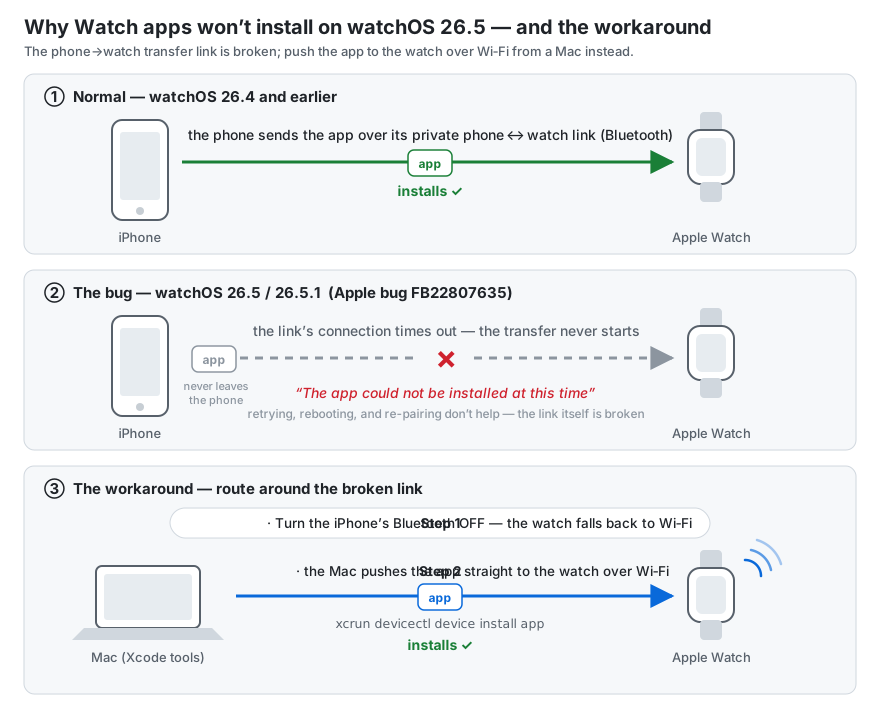
<p>When you tap Install in the iPhone's Watch app, the app doesn't come from the internet to the watch — <strong>the iPhone transfers it to the watch over their private phone↔watch link</strong> (Apple's Identity Services layer, riding Bluetooth). On watchOS 26.5, opening that transfer socket times out — so the install fails after a minute, no matter how many times you retry, reboot, or re-pair. The app never leaves the phone.</p>
<p>That also explains why the workaround works: take Bluetooth away, and the watch falls back to WiFi — where a Mac can hand it the app directly, skipping the broken relay entirely.</p>
<p><img src="/assets/watchos-26-5-install-bug-diagram.svg" alt="How the watchOS 26.5 install bug works, and the workaround"></p>
<h2>What does NOT work (I tried all of it)</h2>
<ul>
<li>Rebooting phone and watch (in every order)</li>
<li>Toggling the app off/on in the iPhone's Watch app</li>
<li>Unpairing and re-pairing the watch (others in the thread also ruled out factory resets and fresh certificates/provisioning profiles)</li>
<li>Toggling Bluetooth off/on on <strong>both</strong> devices — this one is worth trying first, because it <em>has</em> worked for several people in the forum thread. It didn't take for me. If it doesn't for you either, the fix below is the reliable path.</li>
<li>TestFlight instead of a dev build — same phone↔watch transfer path, same failure</li>
</ul>
<p>If you're a developer, Xcode &quot;Run&quot; against the watch also stalls, for a <em>different</em> reason — see below. That combination (store path broken + Xcode path broken) is what makes this bug so disorienting: every install route fails, each with a different symptom.</p>
<h2>The fix that worked (reproducible)</h2>
<p>The trick is to take Bluetooth out of the equation entirely and push the app over the network path instead. The forum thread independently converged on <code>devicectl</code> as the working install route; what follows is the complete recipe — including the two pieces that cost me the most time (<em>why</em> Bluetooth has to be off first, and which of the tooling's status reports to ignore).</p>
<p>One honest caveat: this is a developer workaround. <code>devicectl</code> ships with Xcode, so if you're distributing to enterprise users or testers who don't have a Mac with dev tools, they're stuck with the Bluetooth-toggle lottery until Apple ships the fix. (Non-developers: also try installing from the App Store <em>on the watch itself</em> — that path downloads directly to the watch rather than relaying through the phone. Reported to help for adjacent variants of this failure, though I haven't tested it on 26.5 myself.)</p>
<p><strong>1. Turn the iPhone's Bluetooth OFF.</strong></p>
<p>This forces the watch onto WiFi and lets the Mac↔Watch CoreDevice tunnel come up. Keep Mac, iPhone, and watch on the same real WiFi network — <em>not</em> the iPhone's Personal Hotspot, which isolates the devices from each other. (In my case the tunnel had been dead for a day — <code>tunnelState=disconnected</code>, <code>ddiServicesAvailable=false</code> — and came up once Bluetooth was off.)</p>
<p><strong>2. Install with <code>devicectl</code> from the Mac — not Xcode &quot;Run&quot;:</strong></p>
<pre><code class="language-bash">xcrun devicectl device install app \
  --device &lt;WATCH-COREDEVICE-ID&gt; \
  --timeout 240 \
  &quot;$HOME/Library/Developer/Xcode/DerivedData/&lt;YourApp&gt;/Build/Products/Release-watchos/&lt;Your Watch App&gt;.app&quot;
</code></pre>
<p>Find your watch's CoreDevice ID with <code>xcrun devicectl list devices</code>. Use the <strong>Release-watchos</strong> build product — it's clean, with no <code>__preview.dylib</code> inside.</p>
<p>Two verification notes, because this path lies to you in both directions:</p>
<ul>
<li><code>devicectl device info details</code> may still report <code>tunnelState=None</code> from stale cache <strong>even when the install succeeds</strong>. Trust the <code>App installed</code> output of the install command, not the info query.</li>
<li>If the install command itself succeeds, the app is on the watch — you don't need the iPhone Watch app to agree, and it may take a while to notice.</li>
</ul>
<h2>Why not Xcode &quot;Run&quot;?</h2>
<p>Xcode blocks on <strong>&quot;Copying shared cache symbols (0%)&quot;</strong>, and on watchOS 26.5 that symbol download fails with an HTTP <strong>403</strong> (&quot;Symbols for watchOS 26.5 — forbidden&quot;). Here's the thing: that download is <em>debugger support only</em> — it has nothing to do with installing the app. <code>devicectl install</code> skips it entirely, which is exactly why it works when Xcode doesn't.</p>
<p>If you don't need to attach the debugger, <code>devicectl</code> is strictly the better path on 26.5.</p>
<h2>Summary</h2>
<table>
<thead>
<tr>
<th>Route</th>
<th>Status on watchOS 26.5</th>
</tr>
</thead>
<tbody>
<tr>
<td>iPhone Watch app → Install</td>
<td>Broken (IDS-over-BT socket timeout, FB22807635)</td>
</tr>
<tr>
<td>TestFlight</td>
<td>Broken (same path)</td>
</tr>
<tr>
<td>Bluetooth off/on toggle, both devices</td>
<td>Works for some (per the thread); didn't for me</td>
</tr>
<tr>
<td>Xcode &quot;Run&quot; to watch</td>
<td>Stalls (shared-cache symbols 403 — unrelated but co-occurring)</td>
</tr>
<tr>
<td><strong>Phone BT off + <code>devicectl install</code> over WiFi</strong></td>
<td><strong>Works</strong></td>
</tr>
</tbody>
</table>
<p>If this saved you a day, it cost me one — file feedback on FB22807635 anyway; duplicate reports are how Apple prioritizes.</p>
]]></content>
	</entry>
</feed>