watchOS 26.5/26.5.1 breaks Watch app installs — the devicectl workaround
Update 2026-08-28: watchOS 26.6 shipped publicly on July 27, 2026. I have not yet re-tested the install path on 26.6, and Apple's release notes don't mention this bug — treat 26.6 as unknown. If you're pinned on 26.5/26.5.1, everything below still applies; if you've tested on 26.6, reporting either way in thread 827053 helps everyone.
If your Apple Watch is on watchOS 26.5 or 26.5.1 and third-party apps won't install — the Watch app on the iPhone spins for about a minute on "Install" and then fails with "could not be installed at this time" — it's not your app, your provisioning, or your pairing. It's an acknowledged Apple regression, and there's a reproducible workaround that doesn't involve waiting for the next watchOS release.
I hit this as a developer trying to get my own dev build onto my watch, but the bug is device-wide: on the same watch, Snapchat and American Airlines failed to install the exact same way. Store apps, TestFlight, enterprise, and dev builds all ride the same broken path.
The bug
On watchOS 26.5/26.5.1, installs from the iPhone's Watch app ("Available Apps → Install", or the "Show App on Apple Watch" toggle) fail after ~1 minute. It worked fine on ≤26.4. Reboots don't help.
You're not alone: Developer Forums thread 827053 has at least six developers reporting the identical failure across enterprise distribution, dev-provisioned OTA installs, and plain Xcode builds — one with an academic project deadline riding on it. Apple has acknowledged it (feedback FB22807635); an Apple engineer replied in June: "it is most likely a regression we have known, and folks are actively working on that." The underlying failure is the transfer socket timing out:
ACXError Code=8 "Failed to create socket"
identityservices Code=20 "Socket open timed out"
As of August 4, 2026, no shipped watchOS release is confirmed to fix it. The newest report in the forum thread (late July) reproduces the failure on watchOS 26.5.2 with iOS 26.5.2; the 26.6 release candidate went to developers on July 20, and as of this writing nobody in the thread has confirmed the fix either way.
What's actually breaking (the plain-English version)
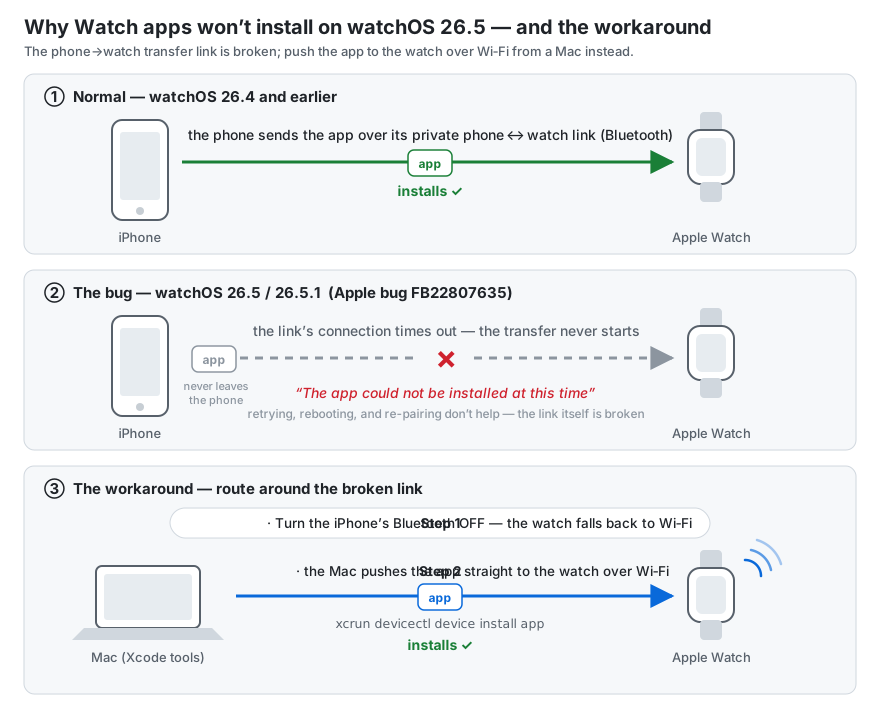
When you tap Install in the iPhone's Watch app, the app doesn't come from the internet to the watch — the iPhone transfers it to the watch over their private phone↔watch link (Apple's Identity Services layer, riding Bluetooth). On watchOS 26.5, opening that transfer socket times out — so the install fails after a minute, no matter how many times you retry, reboot, or re-pair. The app never leaves the phone.
That also explains why the workaround works: take Bluetooth away, and the watch falls back to WiFi — where a Mac can hand it the app directly, skipping the broken relay entirely.
What does NOT work (I tried all of it)
- Rebooting phone and watch (in every order)
- Toggling the app off/on in the iPhone's Watch app
- Unpairing and re-pairing the watch (others in the thread also ruled out factory resets and fresh certificates/provisioning profiles)
- Toggling Bluetooth off/on on both devices — this one is worth trying first, because it has worked for several people in the forum thread. It didn't take for me. If it doesn't for you either, the fix below is the reliable path.
- TestFlight instead of a dev build — same phone↔watch transfer path, same failure
If you're a developer, Xcode "Run" against the watch also stalls, for a different reason — see below. That combination (store path broken + Xcode path broken) is what makes this bug so disorienting: every install route fails, each with a different symptom.
The fix that worked (reproducible)
The trick is to take Bluetooth out of the equation entirely and push the app over the network path instead. The forum thread independently converged on devicectl as the working install route; what follows is the complete recipe — including the two pieces that cost me the most time (why Bluetooth has to be off first, and which of the tooling's status reports to ignore).
One honest caveat: this is a developer workaround. devicectl ships with Xcode, so if you're distributing to enterprise users or testers who don't have a Mac with dev tools, they're stuck with the Bluetooth-toggle lottery until Apple ships the fix. (Non-developers: also try installing from the App Store on the watch itself — that path downloads directly to the watch rather than relaying through the phone. Reported to help for adjacent variants of this failure, though I haven't tested it on 26.5 myself.)
1. Turn the iPhone's Bluetooth OFF.
This forces the watch onto WiFi and lets the Mac↔Watch CoreDevice tunnel come up. Keep Mac, iPhone, and watch on the same real WiFi network — not the iPhone's Personal Hotspot, which isolates the devices from each other. (In my case the tunnel had been dead for a day — tunnelState=disconnected, ddiServicesAvailable=false — and came up once Bluetooth was off.)
2. Install with devicectl from the Mac — not Xcode "Run":
xcrun devicectl device install app \
  --device <WATCH-COREDEVICE-ID> \
  --timeout 240 \
  "$HOME/Library/Developer/Xcode/DerivedData/<YourApp>/Build/Products/Release-watchos/<Your Watch App>.app"
Find your watch's CoreDevice ID with xcrun devicectl list devices. Use the Release-watchos build product — it's clean, with no __preview.dylib inside.
Two verification notes, because this path lies to you in both directions:
devicectl device info detailsmay still reporttunnelState=Nonefrom stale cache even when the install succeeds. Trust theApp installedoutput of the install command, not the info query.- If the install command itself succeeds, the app is on the watch — you don't need the iPhone Watch app to agree, and it may take a while to notice.
Why not Xcode "Run"?
Xcode blocks on "Copying shared cache symbols (0%)", and on watchOS 26.5 that symbol download fails with an HTTP 403 ("Symbols for watchOS 26.5 — forbidden"). Here's the thing: that download is debugger support only — it has nothing to do with installing the app. devicectl install skips it entirely, which is exactly why it works when Xcode doesn't.
If you don't need to attach the debugger, devicectl is strictly the better path on 26.5.
Summary
| Route | Status on watchOS 26.5 |
|---|---|
| iPhone Watch app → Install | Broken (IDS-over-BT socket timeout, FB22807635) |
| TestFlight | Broken (same path) |
| Bluetooth off/on toggle, both devices | Works for some (per the thread); didn't for me |
| Xcode "Run" to watch | Stalls (shared-cache symbols 403 — unrelated but co-occurring) |
Phone BT off + devicectl install over WiFi |
Works |
If this saved you a day, it cost me one — file feedback on FB22807635 anyway; duplicate reports are how Apple prioritizes.